
Claude AI, developed by Anthropic, offers both free and paid access. Many users search for “클로드 무료” (Claude free) to understand what they can use without paying and what limitations apply.
This guide explains Claude’s free tier, its capabilities, usage limits, and how it compares to the paid plans in 2026.
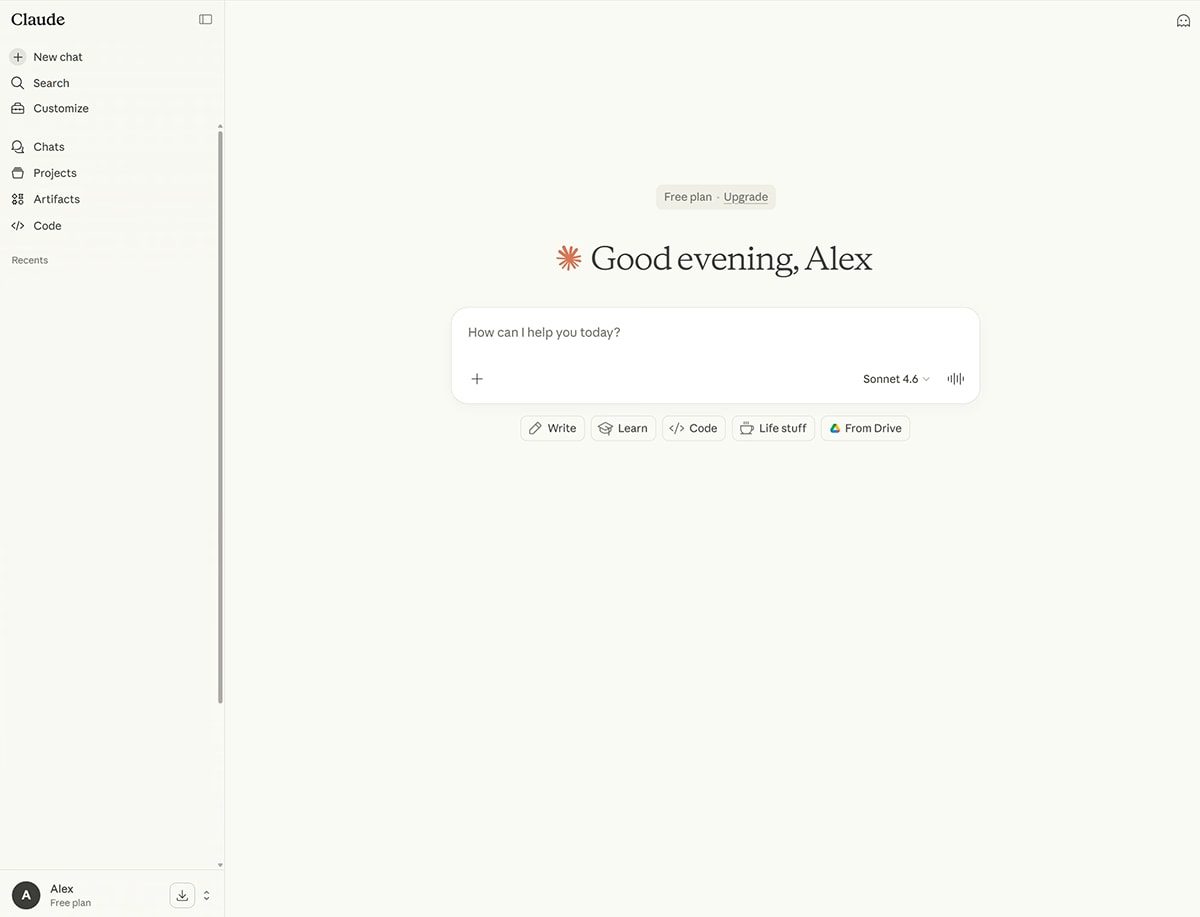
Quick answer: Yes, Claude AI is free to use. Anthropic’s Free plan costs $0 and lets you chat with Claude on the web, desktop, and mobile, search the web, create files and run code, use memory across conversations, connect apps, create Artifacts, and use up to five projects. Usage limits reset on a rolling five-hour window. Paid plans (Pro from $17 a month billed annually, or $20 monthly, and Max from $100 a month) add more usage, more models, and features such as Claude Code.
Is Claude AI Free to Use?
Yes. Claude offers a free tier that allows users to chat with the AI model without a subscription. The free version provides access to core features, though with usage limits and potentially lower priority during peak times.
What You Get with Claude Free
- Access to Claude’s conversational AI
- Ability to ask questions, write content, and analyze text
- Basic file and document support (depending on current features)
- Daily or rate usage limits
- Standard response speed
The free plan is suitable for casual use, learning, and light productivity tasks.
Claude Free vs Paid Plans
| Feature | Free Plan | Paid Plans (Pro/Team) |
|---|---|---|
| Model access | Standard | Higher or priority models |
| Usage limits | Lower | Higher |
| Response priority | Standard | Faster during peak times |
| Advanced features | Limited | More available |
| Cost | Free | Monthly subscription |
How to Access Claude for Free
- Visit the official Claude website or app.
- Create an account or sign in.
- Start chatting on the free tier.
- Monitor your usage if limits apply.
- Upgrade only if you need higher limits or advanced features.
Common Uses for Claude Free
- Writing and editing assistance
- Research and explanations
- Brainstorming ideas
- Coding help
- Summarizing articles or documents
- Learning new topics
Limitations of the Free Plan
- Daily message or usage caps
- Possible slower responses at busy times
- Fewer advanced tools compared with paid versions
- Limited access to the newest or most powerful model variants
- File upload limits may be lower
Tips for Getting the Most from Claude Free
- Write clear and specific prompts
- Break long tasks into smaller requests
- Use it for drafting and then refine manually
- Check usage limits so you are not interrupted mid-task
- Combine with other free tools when needed
Claude Plans Compared (October 2026)
The details below come from Anthropic’s official pricing page. Prices exclude applicable tax and can change.
| Plan | Price | Who it is for | Key extras |
|---|---|---|---|
| Free | $0 | Everyday questions and light use | Chat, web search, files and code execution, memory, connectors, Artifacts, up to 5 projects |
| Pro | $17 a month billed annually ($200 up front) or $20 monthly | Everyday work | At least 5x the Free usage per session, Claude Code, Research, unlimited projects, more models, Claude in Chrome and Microsoft 365 |
| Max 5x | $100 a month | People using Claude all day | 5x Pro usage, higher output limits, priority access, $100 a month in API credits |
| Max 20x | $200 a month | Heaviest individual users | 20x Pro usage, higher output limits, priority access, $200 a month in API credits |
| Team and Enterprise | Varies | Organisations | Admin controls, single sign-on, central billing and more |
Which Claude Models Can Free Users Access?
According to Anthropic’s plan comparison, Free users can use Sonnet and Haiku models, while Opus and the most advanced models are reserved for paid plans. All plans offer large context windows that vary by model, which means Claude can work with long documents and conversations.
Free Plan Features Explained
- Chat on every platform: web, Windows and Mac desktop apps, iOS and Android.
- Web search: Claude can look up current information and cite sources.
- File creation and code execution: create and edit documents, spreadsheets, and other files, and run code for analysis.
- Memory: Claude can remember context across conversations, which you can manage in settings.
- Connectors: link apps and tools so Claude can work with your information.
- Artifacts: interactive outputs such as documents, small apps, and visualisations shown next to the chat.
- Claude Design, Slides and Docs: create visual designs, presentations, and documents.
- Voice mode and incognito chats: talk to Claude or chat without saving history.
- Projects: up to five projects on the Free plan to organise related chats and files.
What the Free Plan Does Not Include
Anthropic’s pricing page lists several features as paid only, including:
- Claude Code, Anthropic’s coding tool for the terminal and development environments
- Research, for longer, multi-step investigations
- Claude in Chrome and Claude for Microsoft 365 and Outlook
- Access to Opus models
- Usage credits to keep working after reaching a limit
How Claude Free Usage Limits Work
Claude does not give a fixed number of free messages. Anthropic explains that every plan has usage limits that reset on a rolling five-hour session window, and how much you can do depends on the length and complexity of your conversations, the model you choose, and the features you use. Long chats and large files use your allowance faster.
When you reach the limit on the Free plan, you can wait for it to reset or upgrade. You can check your usage at any time in Settings, then Usage.
How to Make Your Free Usage Last Longer
- Start a new chat for new topics. Long conversations use more of your allowance because Claude rereads the context.
- Be specific in your first message so you need fewer follow-ups.
- Upload only the relevant pages of long documents.
- Use projects to store background information once instead of pasting it repeatedly.
- Batch related questions into one well-structured message.
- Plan heavy work around the five-hour reset window.
Is It Worth Upgrading to Claude Pro?
Upgrading usually makes sense if you:
- Regularly hit the free usage limit
- Want access to Opus and more advanced models
- Need Claude Code for programming
- Use Research for in-depth investigations
- Want Claude inside Chrome, Microsoft 365, or Outlook
If you use Claude a few times a week for writing, questions, and summaries, the Free plan may be enough.
Claude Free vs ChatGPT Free vs Gemini Free
| Factor | Claude Free | ChatGPT Free | Gemini Free |
|---|---|---|---|
| Developer | Anthropic | OpenAI | |
| Strengths | Writing, long documents, careful reasoning | Wide feature set and integrations | Google app integration |
| Usage limits | Rolling five-hour window | Usage limits apply | Model and usage limits apply |
| Upgrade path | Pro and Max | Paid ChatGPT plans | Google AI plans |
Each provider changes its free tier regularly, so compare current plan pages before choosing.
Privacy on the Free Plan
Anthropic’s plan comparison lists model training as opt-out on individual plans, including Free. If you do not want your chats used to improve models, check the privacy settings in your account. Avoid sharing sensitive personal or confidential business information in any AI chat.
How to Cancel or Downgrade
If you try Pro and decide the Free plan is enough, you can cancel at any time in Settings, then Billing. Your plan stays active until the end of the billing period, then your account moves to the Free plan, and your chats, projects, and files remain in your account. Subscriptions made through the App Store or Google Play must be cancelled there.
Key Takeaways
- Claude AI has a free tier available for general use.
- The free plan includes core chat features with usage limits.
- Paid plans offer higher limits, priority access, and more features.
- Free access is sufficient for many everyday tasks.
- Official Anthropic channels provide the most accurate current details.
- Claude Free includes web search, file creation, memory, connectors, Artifacts, and up to five projects.
- Free users get Sonnet and Haiku models, while Opus, Claude Code, and Research require a paid plan.
Related Guides
- LLM Leaderboard: Complete Guide to Ranking Large Language Models
- LLM Leaderboard Explained: How AI Models Are Ranked and Compared
- Opus Pricing: Plans, Costs and What Users Should Know
Frequently Asked Questions
Is Claude completely free?
Claude offers a free plan with limits. Unlimited or advanced use requires a paid subscription.
What are the limits on Claude free?
Limits typically include a daily or hourly message cap. Exact numbers can change, so check the official site.
Is the free version of Claude good enough?
Yes, for most casual writing, learning, and research tasks. Heavy or professional use may benefit from a paid plan.
How does Claude free compare to ChatGPT free?
Both offer capable free tiers. Differences appear in writing style, reasoning approach, and specific feature availability.
How many messages can I send on Claude Free?
There is no fixed message count. Anthropic says usage resets on a rolling five-hour window, and the amount you can do depends on conversation length, complexity, the model, and features you use. Shorter chats and smaller files let you send more messages before reaching the limit.
Does Claude Free include Claude Code?
No. According to Anthropic’s pricing page, Claude Code is included in paid plans such as Pro and Max, not the Free plan. Free users can still ask Claude to write, explain, and debug code in the chat, and can create files and run code within conversations.
How much does Claude Pro cost?
Claude Pro costs $20 a month when billed monthly, or $17 a month with an annual subscription billed as $200 up front, according to Anthropic’s pricing page. Prices exclude applicable tax. Pro includes at least five times the Free plan’s usage per session, plus Claude Code, Research, and more models.
Can I use Claude Free on my phone?
Yes. The Free plan includes chat on the web, desktop apps for Windows and Mac, and mobile apps for iOS and Android. Your conversations sync across devices when you sign in with the same account, and voice mode lets you talk to Claude instead of typing.
Is Claude Free good for students?
Claude Free is useful for students who want help understanding topics, planning essays, summarising readings, and checking explanations. It includes web search, memory, and up to five projects, which can be organised by subject. Students should follow their school’s AI policy and use Claude to learn rather than to submit work as their own.
Will I lose my chats if I downgrade to Claude Free?
No. Anthropic says cancelling a paid plan does not delete your data. Your chats, projects, and files stay in your account after it moves to the Free plan, although some paid features, such as extra projects beyond the free limit or Claude Code, will no longer be available until you upgrade again.






Leave a Reply