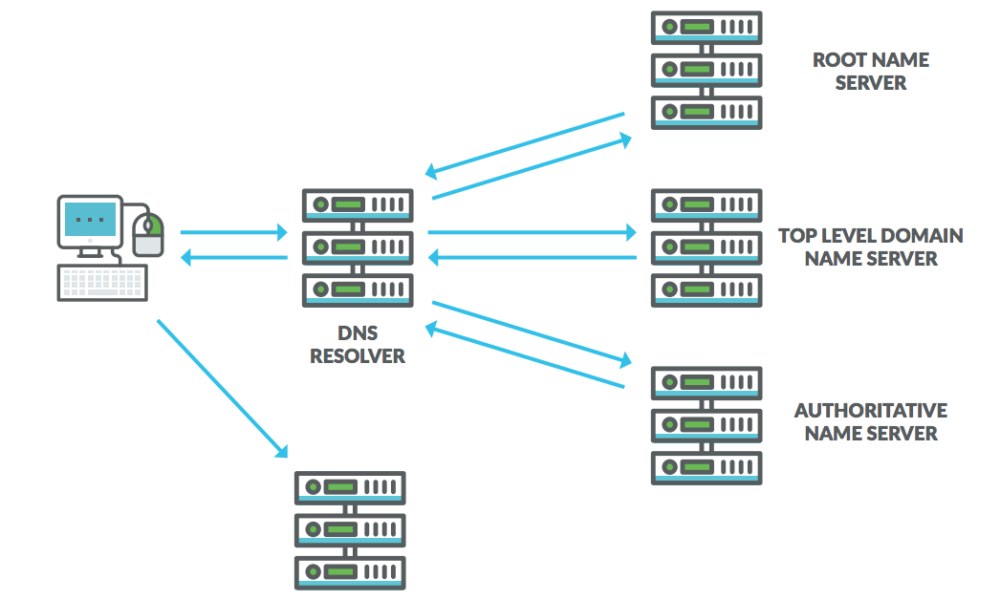

DNS stands for the Domain Name System. It is the internet’s phone book: it translates human-friendly website names into the numerical IP addresses computers use to connect. DNS name resolution happens in milliseconds every time you load a page.
What Does DNS Stand For?
DNS stands for Domain Name System. It is the system that translates website names you type into a browser into the IP addresses that servers and routers actually use. Without DNS, you would need to memorise long strings of numbers to visit any site.
How Does DNS Name Resolution Work?
DNS name resolution follows a short chain of lookups:
- Your browser asks a DNS resolver (usually run by your internet provider) for the site’s IP address.
- The resolver queries a chain of servers: first the root servers, then the servers for the domain ending (like .com), then the authoritative server for the domain itself.
- The authoritative server returns the correct IP address.
- Your browser connects to that address and loads the page.
Results are cached along the way, so repeat visits resolve even faster. DNS records such as A, AAAA and CNAME entries tell the system which address or alias belongs to each name. You can read more in the Domain Name System overview on Wikipedia or Cloudflare’s plain-English guide to DNS.
How DNS and HTML Work Together
Once DNS returns the IP address, your browser connects to the web server and requests the page. The server sends back the HTML content – the code and files that make up the webpage – and your browser displays it. DNS handles the addressing; HTML handles the content.
Why DNS Matters When Things Break
The whole chain is invisible when it works. When a site will not load, one of the first things to check is whether DNS is resolving properly. A wrong or unreachable DNS setting can make every site appear down even when your connection is fine. Understanding this step makes troubleshooting far clearer.
Frequently Asked Questions
What does DNS stand for?
DNS stands for Domain Name System, the service that translates domain names into IP addresses.
How long does DNS resolution take?
Usually only milliseconds. Caching by your browser, operating system and resolver makes repeat visits even faster.
What happens if DNS fails?
Your browser cannot find the server, so pages will not load even though your internet connection may be working.
What are common DNS record types?
A records map a domain to an IPv4 address, AAAA records map to IPv6 addresses, and CNAME records create an alias from one name to another.
What is DNS caching?
DNS caching stores recent lookup results temporarily so the same name does not need a full lookup chain every time.







Leave a Reply