

Dify is an open-source platform that helps developers and teams build, deploy and manage applications powered by large language models. It provides tools for creating AI workflows, chatbots and custom LLM applications without starting from scratch.
This guide explains what Dify is, its main features, how it works, common use cases and what users should know about the platform in 2026. It also covers the related search terms “dify”, “dify ai” and “dify とは”.
Quick answer: Dify is an open-source platform from LangGenius for building applications powered by large language models (LLMs). It combines a visual workflow builder, retrieval-augmented generation (RAG) for your own documents, AI agents, prompt testing, monitoring and ready-made APIs, so teams can move from prototype to production without writing all the infrastructure themselves. You can use the hosted Dify Cloud or self-host it.
What Is Dify?
Dify is an open-source LLM application development platform. It allows users to connect different large language models, design prompts and workflows, and deploy AI-powered applications. The platform is designed to make it easier to build production-ready AI tools.
The name “Dify” is often searched together with terms such as “dify ai” and “dify とは” (which means “what is Dify” in Japanese).
Key Features of Dify AI
- Visual workflow builder for LLM applications
- Support for multiple large language models
- Prompt management and versioning
- RAG (Retrieval-Augmented Generation) capabilities
- API access for integration
- Open-source and self-hostable
- User-friendly interface for both developers and non-developers
How Dify Works
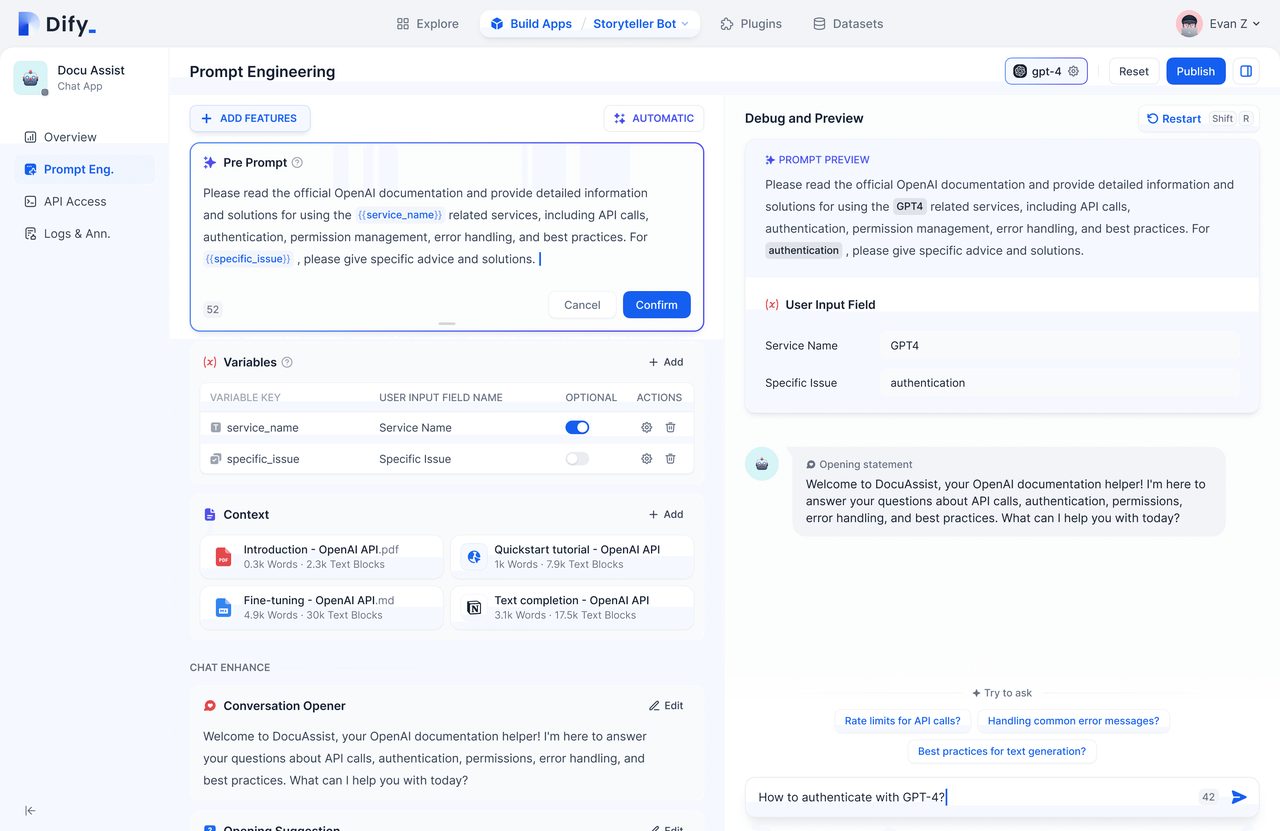
- Connect one or more LLM providers.
- Design prompts or multi-step workflows.
- Add knowledge bases or external data if needed.
- Test the application inside the platform.
- Deploy it via API or as a standalone app.
- Monitor usage and performance.
This structure helps teams move from idea to working AI application more quickly.
Common Use Cases for Dify
- Building custom chatbots
- Creating internal knowledge assistants
- Developing AI-powered customer support tools
- Automating content or data processing workflows
- Prototyping LLM applications before full development
- Integrating AI features into existing products
Dify vs Other LLM Platforms
| Aspect | Dify | Typical Alternatives |
|---|---|---|
| Open source | Yes | Often no |
| Self-hosting | Supported | Limited |
| Workflow builder | Visual | Varies |
| Model flexibility | High | Varies |
| Ease of use | Moderate to high | Varies |
Benefits of Using Dify
- Faster development of LLM applications
- Flexibility to choose and switch models
- Ability to self-host for data control
- Active open-source community
- Suitable for both prototypes and production use
Limitations to Consider
- Requires some technical setup for self-hosting
- Advanced workflows may still need developer involvement
- Performance depends on the connected LLM
- Documentation and features continue to evolve
- Enterprise support options may be limited compared with commercial platforms
Dify at a Glance
| Item | Details |
|---|---|
| What it is | Open-source LLM application development platform |
| Developer | LangGenius |
| Source code | GitHub repository langgenius/dify |
| Ways to use it | Dify Cloud (hosted), self-hosted Community Edition, Dify Enterprise |
| Main building blocks | Workflows, RAG pipelines, agents, prompt IDE, LLMOps, APIs |
| Model support | Many proprietary and open-source models, including any OpenAI API-compatible model |
| Typical users | Developers, product teams, AI engineers and technically minded business users |
Core Features Explained
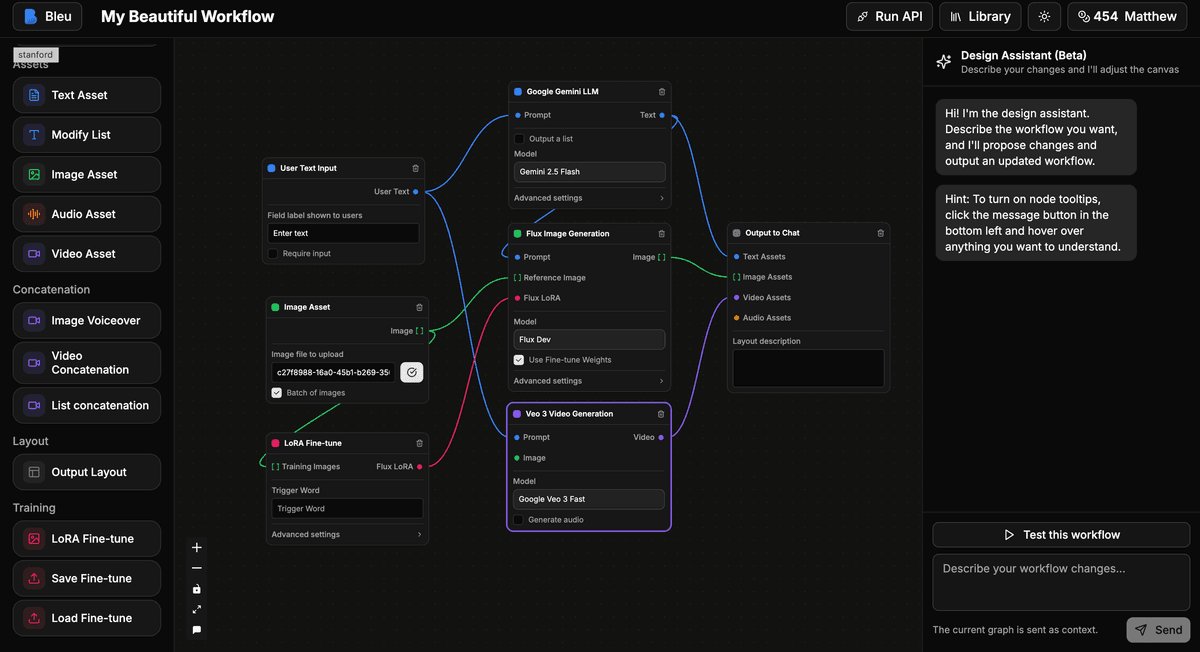
Visual workflow canvas
You build applications by connecting nodes on a canvas, such as an LLM call, a knowledge retrieval step, a condition, a code block or an HTTP request. Each step can be tested individually, which makes complex logic easier to debug.
Model management
Dify connects to a wide range of model providers and self-hosted models. You can switch models without rebuilding the application, which helps when comparing cost, speed and quality.
Prompt IDE
A workspace for writing prompts, comparing how different models respond and adding features such as text-to-speech to chat applications.
RAG pipeline
Dify can ingest documents such as PDFs and presentations, split them into chunks, index them and retrieve relevant passages at question time. This lets an assistant answer from your own content rather than relying only on the model’s training data.
Agents
Agents can use tools to complete open-ended tasks. Tools can come from the Dify Marketplace, from MCP (Model Context Protocol) servers or from your own APIs, and an agent can run as a chat app or as one step in a workflow.
LLMOps and observability
Logs, annotations and performance monitoring help you improve prompts and data based on real usage. Dify also integrates with observability tools such as Langfuse, Opik and Arize Phoenix.
Backend as a Service
Every application you build comes with an API, so you can plug it into a website, mobile app or internal system.
Types of Apps You Can Build in Dify
- Chatbots that answer questions using your knowledge base
- Text generators for tasks such as drafting product descriptions or summaries
- Agents that combine reasoning with tool use
- Chatflows that add multi-step logic and memory to conversational apps
- Workflows for automated, non-chat processes such as document processing or data enrichment
How to Get Started with Dify Cloud
- Create an account on the Dify website.
- Add a model provider by entering the API key for the model service you want to use.
- Create a new app and choose a type, such as a chatbot or workflow.
- Add a knowledge base by uploading documents if you want answers grounded in your content.
- Write and test your prompt in the built-in debugging panel.
- Publish the app as a web page, embed it on your site or call it through the API.
Check the Dify pricing page for current plans and usage allowances, as these change over time.
How to Self-Host Dify
According to the official repository, the simplest route is Docker Compose. The minimum requirements listed are a CPU with at least 2 cores and at least 4 GiB of RAM, with Docker and Docker Compose installed.
- Clone the Dify repository from GitHub.
- Open the docker folder inside the project.
- Copy the example environment file to create your own configuration file.
- Start the services with Docker Compose.
- Open the installation page in your browser and create the administrator account.
- Add model providers and start building apps.
Self-hosting gives you control over data and infrastructure, but your team becomes responsible for updates, backups and security.
Example: Building an Internal Knowledge Assistant
A common first project is an assistant that answers staff questions from company documents:
- Collect policies, handbooks and FAQs in a single folder.
- Upload them to a Dify knowledge base and choose a chunking method.
- Create a chatbot app and connect the knowledge base.
- Write a system prompt telling the assistant to answer only from the provided documents and to say when it does not know.
- Test with real questions from colleagues and refine the retrieval settings.
- Share the app internally and review logs to find missing information.
Dify Compared with Related Tools
Dify vs LangChain
LangChain is a developer framework used in code. Dify is a platform with a visual interface, hosting options, monitoring and APIs. Teams that want full control in code may prefer a framework, while teams that want faster building and collaboration often choose a platform such as Dify.
Dify vs Flowise
Both offer visual builders for LLM apps. Dify includes a broader set of built-in features, such as knowledge base management, monitoring and app publishing, while Flowise focuses on visual chaining of components.
Dify vs general automation tools
Tools such as Zapier and n8n automate tasks across many apps and have added AI steps. Dify is designed specifically around LLM applications, with deeper features for prompts, retrieval and agents.
Best Practices for Dify Projects
- Start small with one clear use case and measurable success criteria.
- Clean your documents before uploading, since retrieval quality depends on source quality.
- Ground answers by instructing the model to rely on retrieved content and cite it where possible.
- Test with real users and review logs regularly.
- Control costs by choosing suitable models for each step, using smaller models for simple tasks.
- Protect data by checking where it is processed and stored, especially for sensitive information.
Licence and Commercial Use
Dify publishes its code under its own open-source licence, which is based on Apache 2.0 with additional conditions. Before building a commercial product or offering Dify to multiple customers as a service, read the current licence in the official repository and contact the company if anything is unclear.
Key Takeaways
- Dify is an open-source platform for building LLM-powered applications.
- It supports workflows, RAG, multiple models, and API deployment.
- The platform is useful for chatbots, internal tools, and AI prototypes.
- Self-hosting provides greater control over data.
- It is frequently searched as “dify,” “dify ai,” and “dify とは.”
- Dify can be used as a hosted cloud service or self-hosted with Docker Compose on modest hardware.
- Its RAG pipeline lets assistants answer from your own documents rather than only from model training data.
Frequently Asked Questions
What is Dify AI?
Dify is an open-source platform that helps users build and deploy applications using large language models.
Is Dify free to use?
Yes, the core platform is open source. Costs may apply for hosted services or the LLMs you connect.
Can I self-host Dify?
Yes. Dify supports self-hosting, which is useful for teams that need data privacy and control.
What can I build with Dify?
Common projects include chatbots, knowledge assistants, automated workflows, and custom AI tools.
Who makes Dify?
Dify is developed by LangGenius and published as an open-source project on GitHub under the repository langgenius/dify. The company also runs the hosted Dify Cloud service and offers an Enterprise edition with features such as single sign-on, role-based access control and support agreements for larger organisations.
Do I need to code to use Dify?
No. Many apps can be built entirely through Dify’s visual interface, including chatbots, knowledge assistants and workflows. Basic technical understanding helps, particularly for connecting model providers and APIs, and developers can add code blocks or call Dify apps from their own software when needed.
What is RAG in Dify?
RAG, or retrieval-augmented generation, is a method where the app searches your uploaded documents for relevant passages and gives them to the language model when answering. In Dify, the knowledge base handles document upload, chunking, indexing and retrieval, which helps produce answers based on your own content.
What are the system requirements to self-host Dify?
The official repository lists a minimum of a 2-core CPU and 4 GiB of RAM, with Docker and Docker Compose installed. Larger knowledge bases, more users or local models need more resources, so plan capacity based on expected usage and test performance before rolling it out widely.






Leave a Reply