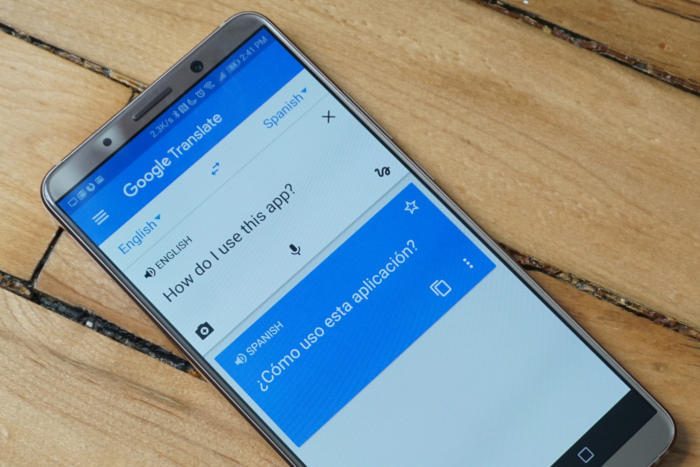

Translating from English into other languages is a daily need for students, professionals, travelers, and content creators. Modern tools have made translation faster, but achieving accurate and natural results still requires the right methods and review.
This guide explains the best ways to translate from English, compares leading tools, and shares practical tips for higher quality output. It covers searches such as “översätt från engelska.”
Quick answer: To translate from English accurately, use a strong machine translation tool such as DeepL, Google Translate or Microsoft Translator for everyday text, or an AI assistant when you need control over tone and context. Write clear source text, give the tool context, compare results from two tools for important content and have a native speaker or professional translator review anything official, legal, medical or published.
Why Accurate Translation from English Matters
English is widely used in business, education, technology, and media. Poor translation can lead to misunderstandings, unprofessional communication, or loss of meaning. Good translation preserves both the information and the intended tone.
Best Tools to Translate from English
- Google Translate
Fast, free, and supports a large number of languages. Suitable for everyday use and quick understanding.
- DeepL
Known for producing more natural and fluent translations, especially for European languages.
- Microsoft Translator
Integrated with Microsoft products and offers solid accuracy for many language pairs.
- AI Chat Models
Tools such as ChatGPT or Claude can translate while also explaining nuances or adapting tone when prompted carefully.
- Professional Human Translation
Still the highest quality option for legal, medical, marketing, or published content.
How to Get Better Translations from English
- Write clear and simple source sentences when possible.
- Provide context to the translation tool.
- Specify the desired tone (formal, casual, technical).
- Translate short sections rather than very long blocks at once.
- Review the output carefully.
- Use a second tool to compare important translations.
- Ask a native speaker to check critical content.
Common Translation Problems
- Literal translations that sound unnatural
- Loss of idioms and cultural references
- Incorrect technical terminology
- Grammar errors in the target language
- Inconsistent tone
- Missing context leading to wrong meaning
Free vs Paid Translation Options
| Option | Speed | Quality | Best For |
|---|---|---|---|
| Free online tools | Very fast | Good | Everyday use |
| AI models with prompts | Fast | Good to high | Nuanced or creative text |
| Professional translators | Slower | Highest | Official or published work |
Tips for Specific Situations
Students
Use tools for understanding, then rewrite in your own words to ensure comprehension.
Business Users
Double-check contracts, emails, and customer-facing text. Consider professional review for important documents.
Travelers
Offline translation apps and phrasebooks remain useful when internet access is limited.
Content Creators
Adapt rather than directly translate to fit the target audience’s culture and style.
Key Translation Terms
- Source language: the language you translate from, here English.
- Target language: the language you translate into.
- Machine translation (MT): automatic translation by software such as Google Translate or DeepL.
- Post-editing: a human reviewing and correcting machine translation.
- Localisation: adapting content for a specific country or culture, including currency, dates, measurements and cultural references, not just words.
- Glossary: a list of approved translations for specific terms, used to keep terminology consistent.
- Certified translation: an official translation, often required for legal or immigration documents, that includes a statement from the translator or agency confirming its accuracy.
Comparing Popular Translation Tools

| Tool | Strengths | Things to watch | Good for |
|---|---|---|---|
| Google Translate | Very wide language coverage, camera and conversation modes, free | Can be literal with idioms and specialist terms | Travel, quick checks, less common languages |
| DeepL | Natural-sounding output for many European and Asian languages, formality options, glossaries on some plans | Fewer languages than Google Translate | Emails, articles, business documents |
| Microsoft Translator | Integration with Office apps, conversation mode for groups | Quality varies by language pair | Office workflows, multilingual meetings |
| AI assistants (ChatGPT, Gemini, Claude) | Can follow instructions about tone, audience and terminology, explain choices | Can occasionally add or omit content | Marketing, creative text, explaining nuance |
| Professional translators | Highest accuracy, cultural expertise, accountability | Cost and time | Legal, medical, official and published content |
Google Translate supports well over 200 languages after major expansions, which makes it the most practical choice for many less widely spoken languages.
Step-by-Step: Translating an Important Document
- Prepare the English source. Fix typos, shorten long sentences and replace ambiguous phrases.
- Create a mini glossary of product names, technical terms and words that should not be translated.
- Translate with your main tool, section by section.
- Compare key passages with a second tool. Where they differ, investigate the meaning.
- Back-translate critical sentences into English with a different tool to check that the meaning survived.
- Check formatting, such as dates, numbers, currencies and names.
- Have a native speaker review the final version, ideally someone familiar with the subject.
How to Write English That Translates Well
- Use one idea per sentence.
- Avoid idioms such as "hit the ground running" or "a piece of cake".
- Avoid sarcasm and humour that depend on English wordplay.
- Keep terminology consistent, using the same word for the same thing throughout.
- Write numbers and dates clearly, for example "17 October 2026" rather than "10/17".
- Spell out abbreviations the first time you use them.
AI Prompt Template for Better Translations
When using an AI assistant, a detailed prompt gives much better results than "Translate this":
"Translate the text below from English into Spanish (Spain) for small business owners. Use a friendly but professional tone, keep product names in English, and use 'usted' rather than 'tú'. Keep the formatting. After the translation, list any phrases where the meaning was ambiguous."
Adapt the target language, region, audience and tone to your needs.
Translation Examples: Literal vs Natural
| English | Literal problem | Better approach |
|---|---|---|
| "It's raining cats and dogs." | Translated word for word, it makes no sense in most languages | Use the target language's own expression for heavy rain |
| "Break a leg!" | Can sound like a threat | Use the local way of wishing someone good luck |
| "We'll touch base next week." | May be translated too literally | "We will speak again next week" |
| "Sign up today." | Tone may be too blunt in some cultures | Adjust politeness level to the audience |
Translating for Different Regions
Many languages have regional variations that matter:
- Spanish: Spain and Latin American countries differ in vocabulary and formality.
- Portuguese: European and Brazilian Portuguese differ in spelling, vocabulary and grammar.
- French: France, Canada, Belgium and African French-speaking countries use different expressions.
- Chinese: Simplified Chinese is used in mainland China, Traditional Chinese in Taiwan and Hong Kong.
- Arabic: Modern Standard Arabic is used in formal writing, while spoken dialects vary widely.
Always tell your tool or translator which region you are writing for.
Privacy and Confidentiality
Free online tools may process or store the text you paste. For contracts, medical records, personal data or confidential business information, check the tool's privacy terms, use a business plan with suitable data protections, or work with a professional translator bound by confidentiality.
When to Use a Professional Translator
Use a qualified human translator for:
- Legal contracts and court documents
- Immigration, visa and official certificates, which often require certified translation
- Medical information and instructions
- Published books, websites and marketing campaigns
- Anything where a mistake could cause harm, legal risk or reputational damage
In the UK, professional bodies such as the Chartered Institute of Linguists (CIOL) and the Institute of Translation and Interpreting (ITI) list qualified translators.
Quality Checklist Before You Publish a Translation
- Every sentence of the original has been translated, with nothing missing or added
- Names, numbers, dates and prices match the English source
- Terminology follows your glossary consistently
- Tone and formality suit the audience and region
- Headings, links and formatting work correctly
- A native speaker has read the final version
Key Takeaways
- Multiple strong tools exist for translating from English.
- DeepL and well-prompted AI models often produce more natural results.
- Always review important translations.
- Context and clear source text improve accuracy.
- Professional human translation remains best for high-stakes content.
- Clear, idiom-free English and a short glossary make every translation tool more accurate.
- Back-translation and a second tool help catch errors, but official content still needs a professional.
Frequently Asked Questions
What is the most accurate tool to translate from English?
DeepL is frequently praised for natural output. Google Translate is excellent for speed and broad language support. Results vary by language pair.
Can AI translate better than traditional tools?
In many cases, modern AI models produce more fluent translations, especially when given clear instructions about tone and context.
Should I trust automatic translation for official documents?
No. Legal, medical, and official documents should be reviewed or translated by qualified professionals.
How can I improve machine translation quality?
Use simple source sentences, provide context, specify tone, and always review the result.
Is DeepL better than Google Translate?
DeepL often produces more natural-sounding translations for many European and some Asian languages, and offers formality options. Google Translate supports far more languages and includes camera and conversation features. The best choice depends on your language pair, so compare both on a sample of your own text.
How do I translate a PDF from English?
Tools such as Google Translate and DeepL let you upload documents, including PDFs, and download a translated version, subject to file size and plan limits. Scanned PDFs may need text recognition first. Always check the formatting and accuracy of the translated file, particularly tables and headings.
What is back-translation?
Back-translation means translating your translated text back into English, ideally with a different tool or person, to check whether the original meaning survived. It does not prove a translation is perfect, but it is a useful way to spot serious meaning errors in important sentences before publishing.
Can I translate English speech in real time?
Yes. Google Translate's conversation mode and Microsoft Translator can listen to spoken English and show or speak a translation almost instantly. Results are best with short, clear sentences and little background noise. For important meetings or medical appointments, a professional interpreter is more reliable.





Leave a Reply